Falling black tiles or an open keyboard: two kinds of piano game
"Piano game" covers two quite different things. The first is piano tiles, a rhythm game: black tiles fall down the screen and you tap each one as it reaches the bottom line; miss one or touch a white square and the game is over. The second is free play: a real keyboard sits on screen, there is no score and no way to lose, and you play whatever notes you like. Piano tiles tests your timing, free play tests your ear. In both, using two hands on a phone makes life a lot easier.
Piano tiles rules, step by step
- Pick a song from the menu; the black tiles start falling as soon as you do.
- A classic piano tiles screen is split into vertical lanes. The black tiles run down those lanes, and everything in between is white.
- Every black tile is one note of the song. When it reaches the bottom line you click or tap it, the note sounds and the melody moves on.
- Miss a black tile or hit a white square and the game ends instantly.
- The more precise your timing, the higher your score.
- The flow speeds up as the song goes on. The real goal is to get from the first note to the last without a single mistake.
Piano Master follows this logic. You play it by clicking or tapping, the menu holds several songs, and you see your score at the end of each run.
The one rule of free play: there are no rules
In free play nothing falls. You press a key on the on-screen keyboard, that note sounds, and it keeps ringing while you hold it. There are no levels, no score and no such thing as a wrong note; the game exists so you can build your own tune.
The Simple Piano is the purest example: a full-size keyboard, sounds sampled from a real piano and the ability to press several keys at once. If the keyboard does not fit on screen, swipe sideways to reach the lower and higher octaves. Music Tools puts drums and a guitar next to the piano; you switch instruments from the menu and play with the same freedom.
The way to make progress in free play is to find a tune you already know by ear. The white keys run C, D, E, F, G, A, B from left to right, and the black keys sit in groups of two and three, which tells you where you are. The white key just left of any pair of black keys is C.
Example: one song, two games
Take "Twinkle Twinkle Little Star". In free play you find C and play C C G G A A G, then F F E E D D C. Hit a wrong key and nothing ends; your ear hears the slip and you fix it. The whole melody stays on the white keys, so you never touch a black one.
In a piano tiles game you would not pick the notes at all. Each note arrives as a black tile, and your only job is to catch it at the bottom line. There is no "which note", only "when". That is the core difference: one kind asks you to build the melody, the other to hold the rhythm.
Playing with two hands: when and how
In piano tiles, the tiles eventually come faster than one finger can manage. Hold the phone in both hands: left thumb for the left half of the screen, right thumb for the right half, so one thumb is coming down while the other lifts. On a tablet, lay it flat and use two index fingers.
In free play your hands have different jobs. The right hand plays the melody while the left holds a single low note or a chord. A mouse can only press one key at a time, so if you want chords, a touch screen is far more comfortable. The Simple Piano and Music Tools both support multi-touch, so two fingers give you two notes together.
Piano tiles tactics
- Watch the very bottom of the screen. Tracking tiles as they fall from the top throws off your tempo; the decision happens at the line.
- Listen to the first few seconds of a song before you speed up. Rushed taps cause early mistakes.
- Turn the sound on. Hearing the melody helps you predict when the next note is coming.
- When the speed climbs, keep your fingers close to the glass. A finger that lifts high comes back down late.
- If you always fail at the same point in a song, memorise that stretch of tiles; the notes of a song arrive in the same order every time.
Common mistakes
The most common piano tiles mistake is tapping too early: your finger may land on white, which ends the game. The second is watching the middle of the screen; at speed you cannot catch the tile at the line from there. The third is sticking to one finger.
In free play, the classic mistake is starting on the black keys. Most simple children's songs need only white keys, so skip the black ones at first. Another is jumping to chords too soon: find the melody with one finger, then add chords.
Which games to practise on
All six games below are single-player and work on a phone. The first two are the pure forms of each kind; the rest train the same skills from a different angle.
Piano Master is where you train timing. Catching black tiles at the line, staying off the white and using two fingers are all learned here, and the flow gets faster as the song goes on.
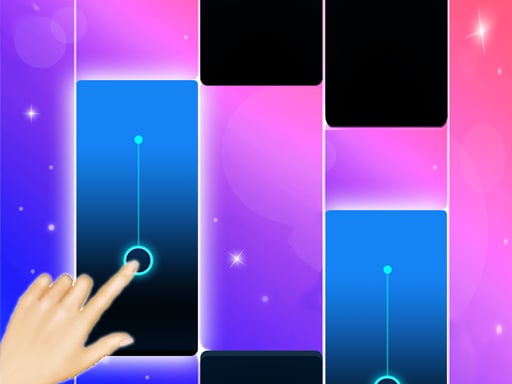
The Simple Piano is for finding tunes by ear: full-size keyboard, real piano sound and chords with multi-touch, with no score and no losing. It will not replace lessons, but it is a handy way to get used to the keys.
Piano Kids Music Songs sits between the two kinds. You choose from piano, xylophone, drum kit, trumpet, flute and guitar, and in song mode the next key to play lights up in turn. With no timer and no losing, it is a good first step for little ones.
Music Tools spreads free play across three instruments: notes on the piano, beats on the drums, chords on the guitar. You play it with the mouse or your fingers rather than the computer keyboard.

Running Roadball is not a piano game, but it trains the same "when" skill in another costume. The ball moves on its own and you tap to make it jump on the beats of the song; the music speeds up as the track goes on.

Bloom is made of short levels played to music. You move with WASD or by dragging, and keeping the sound on lets the tempo of the music hint at the rhythm of each level.

For more, browse the educational, kids and simulation categories. If you are choosing for a young child, the kids games guide helps, and the brain and educational games guide maps out learning games in general.
Frequently asked questions
What happens if I tap a white square in piano tiles?
The game ends on the spot, and missing a black tile does the same. That is why you tap right at the line, not early.
Can I play piano games without reading music?
Yes. In piano tiles you never choose notes, you only time them. In free play you can find simple tunes by ear on the white keys, and the song mode in Piano Kids Music Songs shows you which key comes next.
Can I play with my computer keyboard?
The piano games here are made for mouse and touch, so you press the keys with the pointer or your finger. For chords a touch screen is easier, since a mouse presses one key at a time.
Can a piano game replace piano lessons?
No. Free-play pianos are a sandbox for getting used to the keys and training your ear, and piano tiles is a game that works your sense of rhythm. Real playing technique still needs a teacher or proper lessons.