Which game to set up for your mom, dad or grandpa: calm, familiar picks
The best brain games for seniors tick three boxes at once: the pieces are large on screen, nothing counts down against the player, and the rules are ones they already know. That is why checkers, Ludo, mahjong solitaire and classic solitaire sit at the top of the list. Each one plays with a single tap or click, nothing is lost when you stop halfway, and a grandchild can set it up in five minutes. Below: seven games that fit, who each suits, and setup tips.
What makes a game right for an older player?
Start with the person, not the game. Someone who struggles with small print needs a tidy screen with big pieces. Someone new to the mouse may find drag and drop fiddly, so tap to select games are kinder. And if they dislike being rushed, anything with a countdown goes off the list.
- Are the pieces large and is the screen uncluttered?
- Can the whole game be played with one click or one tap at a time?
- Is there a timer, and if so, can it be ignored without penalty?
- Are the rules already familiar, or is there a new system to learn?
- Is anything lost if the game is left unfinished?
Mostly yes answers means a good place to begin. One honest note: these games are not a treatment or a prevention plan. They ask for focus and a bit of memory, and they are a pleasant pastime, nothing more.
New to screens: start with rules they know
If your parent uses a tablet mainly for calls and photos, pick games that need no explanation, so the only new skill is tapping.
Checkers Legend
The checkers most people learned as children. Checkers Legend can be played against the computer or by two people taking turns on the same device, and the settings let you choose between rule variants. You tap a piece, then tap the square it should move to, with no dragging needed. For a quick rules refresher, our chess and checkers guide for beginners covers the basics.

Ludo Classic
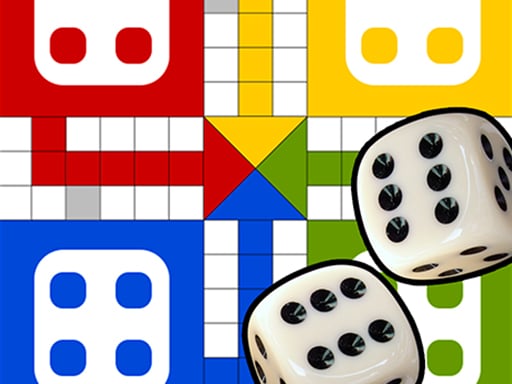
The dice game many families know from rainy afternoons. Ludo Classic keeps the familiar board, the coloured tokens and the dice: one tap to roll, one tap to pick a token. Players take turns on the same screen, ideal for a grandparent and grandchild side by side. Tokens still need a 6 to leave home, just like on the cardboard version; the full rules are in our Ludo rules explainer.
For those who prefer to play alone
Plenty of older players want no opponent at all, just a few quiet rounds with a cup of tea. Tile matching and card sorting suit them: single player, and the pace belongs to whoever holds the tablet.
Mahjong Adventure Puzzle
The calm part is real: Mahjong Adventure Puzzle is built to be finished without hurrying. The rule fits in one sentence: find two matching open tiles and tap them. The first boards use only a few rows, so even someone who has never played mahjong can clear one on the first try. Tired eyes? Look at a tile's colour rather than its pattern.

Mahjong Match
The natural next step once the first mahjong clicks. Mahjong Match is also the tile matching version, not the four player table game. Only tiles with nothing on top and one free side can be picked, which calls for a little more planning. When no free pair is left there is a shuffle option, so a stuck board does not end the fun. To explain the free tile rule, point them to how mahjong solitaire works.

Solitaire Quest
The patience game many people played with a real deck, in a relaxed form. Solitaire Quest is designed to be played without a clock pushing you. The only thing to know is how to stack cards from high to low. On a phone you just select a card and place it, which matters for anyone who finds dragging awkward.

For those who want a little challenge
For crossword fans who do not mind learning something new, two more ideas. Both are calm, but each has one rule to pick up first.
MemoPlay
The classic pairs game: turn over face down cards and find the two pictures of the same sport. MemoPlay offers three difficulty levels. A word of warning: at the start of each level the cards stay open for a few seconds, and that preview gets shorter as the difficulty goes up. Begin on the easiest setting. Naming the sports gear out loud, ball, racket, skis, helps the pictures stick.

Paletto
A logic game that needs no reading at all and works purely with colour. Paletto shows a target pattern at the top; you tap the painters one by one to colour the columns. Each move is a single tap, but you have to think about which colour goes down first. Paint in the wrong order and the pattern will not match, so you simply try again, with no penalty.

Tablet or computer: setup tips
All seven games here also run on phones and tablets. A tablet is usually the most comfortable: bigger than a phone, and no mouse to manage. If a phone is all you have, turning it sideways makes the board larger.
- Open the game once and save it as a bookmark or a home screen shortcut, so nobody has to search for it again.
- Turn the brightness up a little and lengthen the auto lock time.
- On a laptop, the trackpad can be hard work; a separate mouse is easier for most people.
- Keep the volume low at first; some games have music that can be startling.
- Play the first round sitting together, then hand over the tablet completely.
Many browser games show ads, and it is easy to tap one by accident, so in the first session show where the back button is. The checks in our guide to safe browser games for parents apply just as well to grandparents.
Checklist for the first week
- Start with a game they already know: checkers or Ludo.
- Add one game they can play alone: Mahjong Adventure Puzzle or Solitaire Quest.
- Open anything with a preview timer on the easiest level, or save it for week two.
- Bookmark the game and set the volume and brightness.
- Play one round together, then let them carry on alone.
Want more options? Browse the board games and puzzle games categories, or check the mahjong games page for other versions of the tile game.
Frequently asked questions
What matters most when choosing brain games for seniors?
No time pressure. Even with big pieces, a game that keeps counting down spoils the fun for someone who dislikes being hurried. After that come familiar rules and one tap controls.
Do they need to download anything or create an account?
No. Every game here opens in the browser, with no app to install and no sign up. A bookmark is enough to find it again.
Can two people play together?
Checkers Legend and Ludo Classic both let two people take turns on the same device. That makes them a nice excuse for a grandparent and grandchild to sit down side by side.
Will these games improve memory?
We cannot promise that. Memory and mahjong games ask you to concentrate and keep things in mind, but they do not come with a health benefit. Treat them as an enjoyable pastime and they will do their job.