Slope game tips: three habits that keep a speeding ball on the road
The secret to lasting longer in a slope game is making your moves smaller as the ball gets faster. The ball speeds up downhill by itself; you only steer left and right. A firm turn that felt fine at the start will throw the ball off the edge a few hundred metres later. Correct with short taps, pick your path through the red blocks the moment they appear, and start turns early with the perspective in mind. Those three habits stretch most runs.
Slope rules, step by step
- The ball rolls down a sloped road nonstop; you cannot stop it or slow it down.
- You only steer left and right. In Slope City that means A and D or the left and right arrow keys.
- As you go, the road narrows, gaps appear more often and the ball picks up speed.
- Hit a red block or roll off the edge and the run is over.
- Your score is the distance covered. There is no finish line; the goal is to beat your own record.
- In Slope City the road is rebuilt on every attempt, so memorising it is pointless. You read it fresh each run.
Slope City is the purest version of these rules. It needs a keyboard, so a computer is the comfortable choice. If you want to play on a phone, Slope City 2 lets you steer by swiping and adds diamonds and a shop on top.
Smaller inputs as speed builds
The most common way to crash is carrying the move you learned in minute one into minute three. At low speed, holding a key for half a second shifts the ball comfortably and leaves time to straighten out. At high speed, the same press carries the ball to the edge much sooner, with no time left to pull it back. So the faster you go, the shorter each press should be.
In practice: never hold the key. Tap and release. If one correction is not enough, add a second short tap. A long press cannot be taken back halfway; two short taps can be stopped in between. The game's own tip says the same: as speed rises, your corrections have to shrink. Slope City 2 punishes hard turns even more than the first game, so the habit matters even more there.
Reading the red blocks
Red blocks are the real obstacle in slope; gaps are the second threat. To see both at once, look two or three blocks ahead of the ball instead of at it. The ball is already where you put it. The surprises are further down the road.
Read blocks as open corridors, not one by one. In the stretch ahead, find the lane left free between red blocks and move the ball there early. If you have to decide right in front of a block, you are already late, because at high speed even a short tap moves the ball further than you expect.
Steering by the camera angle
In games like this, the camera usually sits behind the ball and a little above it. That has two effects. First, perspective makes the distant road look narrow: a gap or block looks smaller than it is when it first appears and only shows its true size as you approach. Do not dismiss a small obstacle far away; it will grow.
Second, when the road bends, the view turns with it. For a moment, right on screen and right on the road may not be the same thing. The rule is simple: steer by the road in front of the ball, not by the screen. As a bend begins, ease the ball towards the inside of the curve, and stop correcting once the camera has finished turning. Stacking corrections while the view is still rotating is the classic chain mistake that pushes the ball off the road.
A sample run
The ball is in the middle of the road and moving fast. Ahead you see a red block in the left lane and, two blocks behind it, a gap on the right. The block needs no action; staying central already clears it. The real danger is the gap. As soon as you pass the block, one short tap nudges the ball slightly left, so it is already in the safe lane when the gap arrives. One small move handles both obstacles. A big dodge right followed by a turn back left would split the same situation into two risky moves.
Common mistakes
- Holding the key down. The ball swings wide and rolls off the edge.
- Watching the ball. Choose your line when the obstacle first appears, not when it is close.
- Correcting by the screen during a bend. While the view rotates, follow the road itself.
- Veering to a risky edge for a reward. In Slope City 2 most diamonds sit in risky spots; look ahead first, then decide.
- Chasing a record with a new ball. In Slope City 2 a new ball can change the feel of speed; attempt records with the design you know.
Which game to practise with
Slope City: pure speed and red blocks
This is where the short-tap habit is built. It needs a keyboard and is not comfortable on mobile. Since the road changes every attempt, your reading is tested on every run.

Slope City 2: slope on your phone
The same downhill logic on a redesigned city map. Along with A/D and the arrow keys, you can steer with your finger on a phone. Diamonds unlock new balls and abilities in the shop.
Ball Gradient: obstacle rhythm
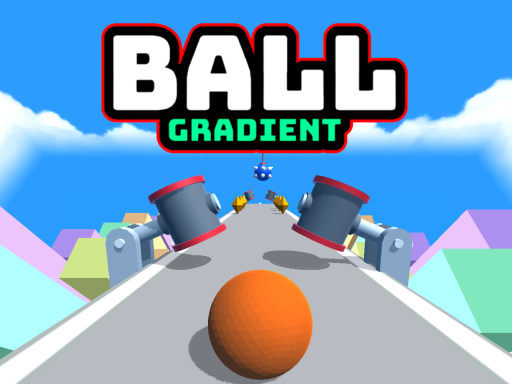
Ball Gradient fills its tracks with swinging, spinning and opening-closing obstacles. Timing leads here: watch an obstacle's rhythm and pass at the right moment. It is played with the arrow keys and needs a keyboard.
Roll Sky Ball 3D: ramps and narrow bridges
Roll Sky Ball 3D runs on narrow tracks built in the sky. Ramps and sliding sections play with the view, so this is the best place to learn not to steer in the air. It is designed for a vertical screen and played with a one-finger swipe.

Roll the Ball 3D: ring precision
Roll the Ball 3D asks you to pass through the exact middle of each ring. Clean passes keep the streak going and raise the speed, while falling ice blocks can end the run. Ideal for training small corrections.

Crazy Obstacle Blitz 2: boost pads
Crazy Obstacle Blitz 2 spikes the pace with boost pads on the floor. It teaches you to pick your lane before hitting a pad, because changing direction gets hard once the speed jumps. The space bar restarts a run.

A suggested order: Slope City if you have a keyboard, Slope City 2 if you are on a phone. Once short taps feel natural, train precision with Roll the Ball 3D and ramp landings with Roll Sky Ball 3D.
To see where ball-rolling games sit in the bigger picture, the platform games guide and the running games guide are good follow-ups. If you would rather drop a ball down a spinning tower than a ramp, read our helix jump tips. The full selection is in the platform category.
Frequently asked questions
Does the slope game have an ending?
Slope City does not; it is an endless run and the aim is to beat your own distance. Track-based games like Ball Gradient and Crazy Obstacle Blitz 2 do have a finish on every track.
Can I play slope on a phone?
Slope City uses keyboard keys, so a computer is the better choice. Slope City 2, Roll Sky Ball 3D, Roll the Ball 3D and Crazy Obstacle Blitz 2 can all be played on a phone by swiping.
Why do I always crash once the speed reaches a certain point?
Most likely your taps stayed the same length while the ball got faster. When you reach that point, halve how long you press and split each correction into two short taps.